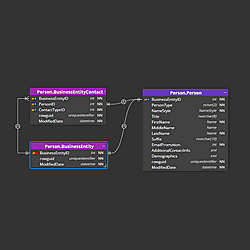
dbdiagram.io Alternative: Luna Modeler for Offline, Visual Database Design
Luna Modeler is a dbdiagram.io alternative for people who want a tool that keeps working without an internet connection, and schemas that stay as files on their own machine. It runs on Windows, macOS, and Linux under a one-time perpetual license.
dbdiagram.io is a browser-based tool for drawing database diagrams using a text-based markup language called DBML. You type table definitions in a code editor, the tool renders the diagram, and your schemas are stored in the cloud. For developers who prefer a code-first workflow and are comfortable with cloud storage, it works well.
For teams that need to work offline, prefer a visual drag-and-drop canvas, want a perpetual license instead of a recurring subscription, or require that schemas never leave their own infrastructure, it does not. This page explains why those teams choose Luna Modeler instead.
An offline dbdiagram.io alternative, not another browser tab
dbdiagram.io runs entirely in the browser. If you lose your internet connection, you lose access to your tool. Your diagrams are stored on dbdiagram's servers, which means a third party holds the structure of your data — table names, field definitions, relationships, and business logic encoded in your model. For engineers in regulated industries, air-gapped environments, or organizations with strict data residency requirements, that architecture is a hard blocker.
Luna Modeler is a desktop application for Windows, macOS, and Linux. Your schemas are stored as local .dmm files on your own machine. Core modeling functionality — creating diagrams, generating SQL, reverse engineering, exporting reports — works fully without an internet connection. Nothing leaves your environment unless you explicitly export or share it.
This is not a configuration option. It is the architecture. Full details on data privacy are documented here.
Visual canvas vs. code editor
dbdiagram.io uses DBML — a text markup language — as its primary interface. You write code to define tables and relationships, and the diagram updates accordingly. This is an efficient workflow for developers who are comfortable writing schema definitions by hand and want a quick way to visualize them.
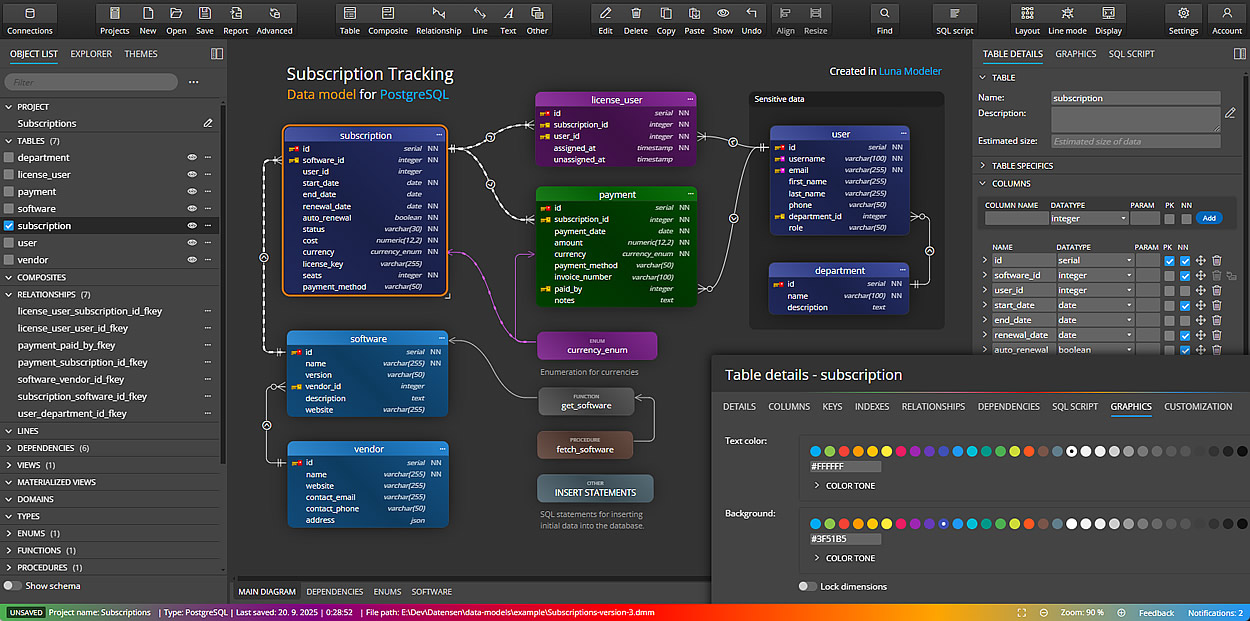
Luna Modeler offers a visual canvas. You create tables, add columns, and draw relationships directly on the diagram. There is no markup language to learn. This makes it more accessible for database administrators, architects, and analysts who think spatially about their schema rather than in terms of code. Complex diagrams with dozens of tables are easier to navigate and reorganize visually than in a text file.
Both approaches are valid. The right choice depends on how your team thinks about database design.
Subscription vs. perpetual license
dbdiagram.io offers a free tier with limitations and paid plans. Team and enterprise plans add collaboration features and centralized workspaces. What happens when you stop paying? Will your diagrams remain locked in a cloud service you no longer control?
Luna Modeler is sold under a perpetual license. You pay once. Your project files are plain files on disk — they belong to you. Optional annual update plans are available for new features, but they are genuinely optional. The version you purchased continues to work after any renewal lapses.
Team collaboration that outgrows a shared workspace
dbdiagram.io's team plan gives you a shared cloud workspace — useful for keeping everyone looking at the same diagram, but it is not version control. There is no per-object diff, no pull request, no way to see exactly which table or column a teammate changed.
Luna Modeler's Ultimate Edition saves a model as a folder of small, human-readable YAML/JSON files — one per table, column, and relationship — instead of a single project file. Commit that folder to Git, or any version control system your development team already runs, and every change becomes a real reviewable diff. Schema changes go through normal pull requests, and merge conflicts stay scoped to the one object two people actually touched, not the whole model.
Pair that with the headless CLI — something dbdiagram.io's browser-only architecture has no equivalent for — to reverse-engineer a database, detect schema drift, and regenerate SQL, documentation, and diagrams automatically from a CI/CD pipeline. Enterprise-grade release automation, run from a terminal, at a fraction of what a team plan costs.
Forward and reverse engineering
dbdiagram.io focuses on diagramming. You can export your diagram as SQL DDL for PostgreSQL or MySQL, which is useful for quick prototyping. It does not offer ALTER script generation, or schema synchronization.
Luna Modeler is built for the full data modeling lifecycle:
- Visual ER diagram creation for Oracle, PostgreSQL, SQL Server, MySQL, MariaDB, and SQLite
- Forward engineering with platform-specific SQL DDL
- Reverse engineering from live databases — import an existing schema directly into a visual model
- ALTER script generation for synchronizing schema changes between model versions
- Schema conversion between database platforms
- Interactive HTML documentation reports for sharing with stakeholders
- Works fully offline — no internet connection required
- Runs natively on Windows, macOS, and Linux
- Folder-based project format for real Git-based team collaboration, with reviewable diffs and pull requests
- Headless CLI for reverse engineering, schema drift detection, and CI/CD automation
Is Luna Modeler the right dbdiagram.io alternative for you?
dbdiagram.io is a capable, developer-friendly tool for quickly sketching a database schema and sharing it via a link. If your workflow is entirely browser-based, you prefer code-driven diagram generation, and you are comfortable with your schemas stored in the cloud, it is a reasonable choice.
Luna Modeler is the right choice when any of the following apply: you need to work offline, your organization requires that schema data never leaves your own infrastructure, you prefer a visual canvas over a code editor, you need reverse engineering for comparison and ALTER script generation, or you want to avoid recurring subscription costs for professional tooling.
Try Luna Modeler free for 14 days
What is the best offline dbdiagram.io alternative?
Luna Modeler is a desktop application for Windows, macOS, and Linux, so ER diagrams, platform-specific SQL generation, reverse engineering, ALTER scripts, and documentation all run without a network connection. Your schemas are local .dmm files rather than records in a hosted workspace.
Is there a free dbdiagram.io alternative?
Free and open-source ER diagram tools exist. Luna Modeler is sold under a one-time perpetual license, with a 14-day free trial that carries no feature restrictions — including reverse engineering and ALTER script generation, which most free tools do not offer.
Can I use Luna Modeler without an internet connection?
Yes. Core modeling functionality works fully offline. License activation requires a one-time internet connection. After that, the tool operates without network access.
Are my schemas stored on Datensen's servers?
No. Your project files are stored on your local filesystem. Nothing is uploaded to cloud or any third party. Full privacy details here.
What happens to my models if I stop renewing the Luna Modeler update subscription?
Nothing. Your license is perpetual — the software continues to work and your project files remain accessible. Update renewals are optional. You never lose access to your models.
Can I share models with my team?
Yes. Project files are plain .dmm files, or a folder-based format built for Git. Share them via Git, a network share, or any file-transfer method your team already uses.
Does dbdiagram.io's team plan compare to Luna Modeler's collaboration features?
Not directly. dbdiagram.io's team plan gives you a shared cloud workspace. Luna Modeler's folder-based format gives you real version control — per-object diffs, pull requests, and merge conflicts scoped to the object that changed — through Git, at no extra subscription cost.
Does Luna Modeler support NoSQL databases?
Luna Modeler is built for relational databases. For MongoDB and other NoSQL databases, try Moon Modeler.
Comparing other data modeling tools?
Luna Modeler is evaluated as a replacement for most established data modeling tools. These pages cover the rest:
- Luna Modeler as a Toad Data Modeler alternative
- Luna Modeler as an erwin Data Modeler alternative
- Luna Modeler as an ER/Studio alternative
- Luna Modeler as a SAP PowerDesigner alternative
- Luna Modeler as a Vertabelo alternative
Disclaimer: Ideamerit s.r.o. is not affiliated with, endorsed by, or sponsored by dbdiagram.io or Holistics Software. The mention of dbdiagram.io is for comparison and informational purposes only.