Luna Modeler Team Collaboration with Git
- Readable diffs One small file per table, column and relationship
- Real pull requests Review schema changes the same way you review code
- Scoped conflicts Merge conflicts touch only the object that changed
- Pay once, use forever A desktop tool with an excellent ROI
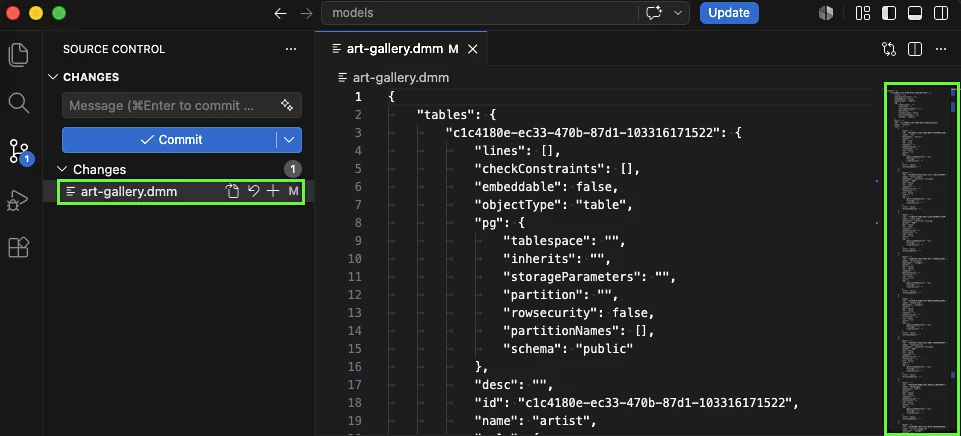
The problem: one file only, difficult review
Code lives in Git. Pull requests, diffs, history - the whole team trusts that workflow for every line of application code. The data model behind that code, meanwhile, often lives as a single opaque project file, emailed around or dropped on a shared drive.
Yet schema changes are frequently the riskiest part of a release — a dropped column or a changed relationship can break far more than a bad line of application code. It's the part of the system with the least review process wrapped around it.
The pain point: lost work and silent conflicts
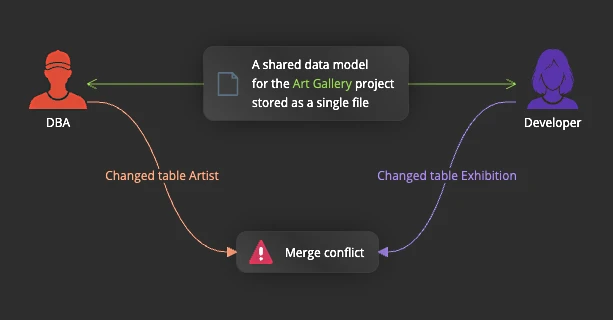
Without file-level diffs, teams fall back on one of two bad habits. Either one person "owns" the model file and everyone else waits their turn, which doesn't scale past a small team. Or two people edit it independently, and whoever saves last quietly overwrites the other person's work — with no merge, no warning, and no record of what was lost.
Either way, the data model ends up as the one part of the system nobody can confidently say is under version control, even though the rest of the codebase has been for years.
How Luna Modeler solves it
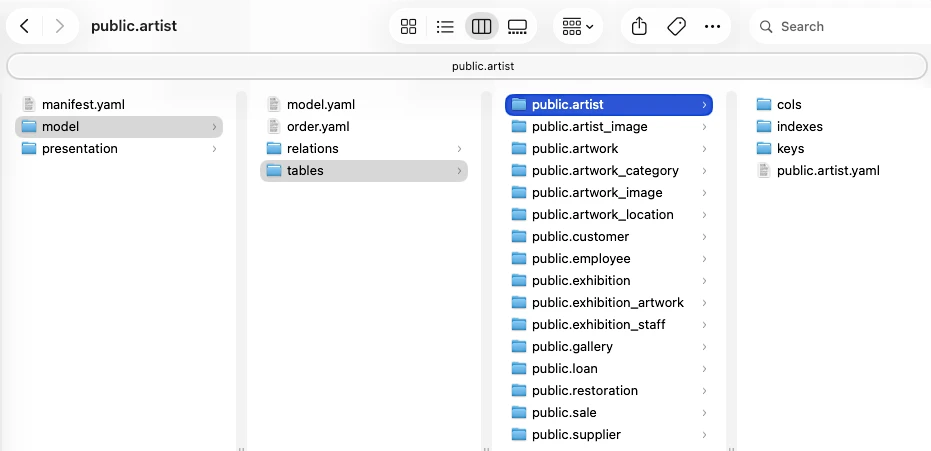
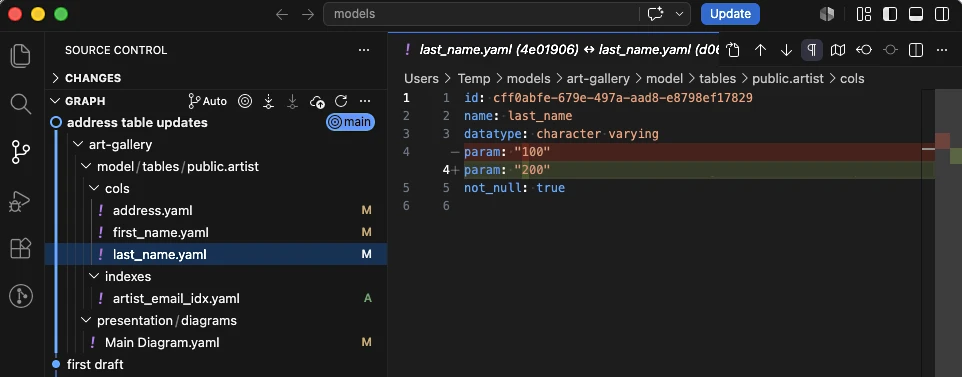
Luna Modeler's folder-based format saves your model as a directory of small, human-readable YAML/JSON files instead of one all-in-one document — one file per table, per column, per relationship, per diagram. Drop that folder straight into Git, or any other version control system, and every commit shows a clean, reviewable diff of exactly what changed.
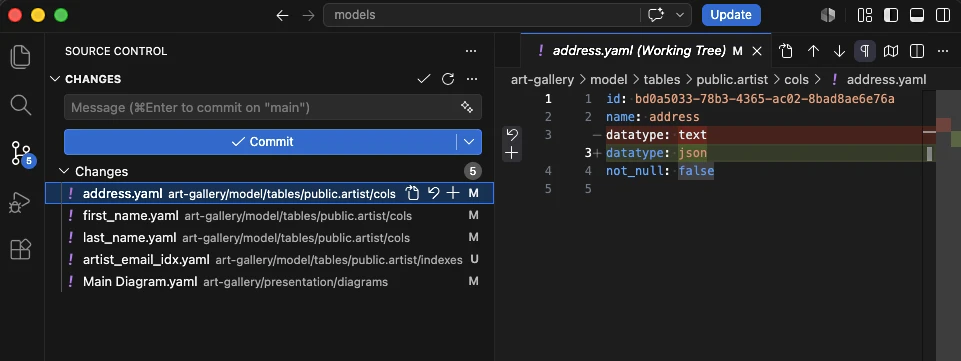
Add a table and one new file appears. Modify a column and one small file changes. The other ninety-nine tables in your model don't show up in the diff at all, because they weren't touched.
Real pull requests for schema changes
Because each object is its own file, a schema change opens as a normal pull request: a reviewer sees "3 tables added, 1 relationship changed," not a wall of unreadable binary noise. Comments, approvals and history work exactly the way they already do for code — nothing new for the team to learn.
And because two people rarely touch the exact same table at once, merge conflicts stay scoped to the one object that genuinely changed in both branches, instead of blocking the entire model on a single shared file.
The workflow, step by step
Bringing your data model under version control is a short, one-time switch:
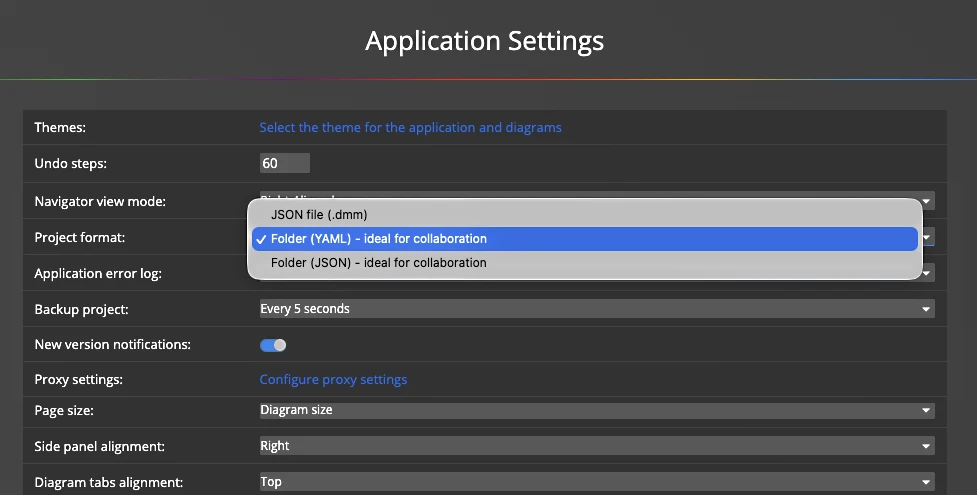
- Switch your project to the folder-based format from the Ultimate Edition's save options or export existing model using the application menu.
- Commit the resulting folder to your Git repository, alongside the codebase it describes.
- Make a change — add a table, edit a column, adjust a relationship — and save again.
- Open a pull request and review the diff like any other change: only the touched files appear.
- Merge once approved; conflicts, if any, are scoped to the specific object edited on both sides.
- Pull and reopen the folder in Luna Modeler to get the latest model — reproduced exactly, down to layout and object ids.
Tip: pair the folder-based format with the headless CLI to regenerate documentation and diagrams automatically every time the model folder changes.
What you get at the end
Your data model gets the same safety net your code already has: a full history of who changed what and when, review before anything merges, and confidence that nothing was silently overwritten. New teammates can read the commit history to understand how the schema evolved, instead of asking around for the "current" version of a file.
Round-tripping is guaranteed — export to the folder format and reimport it, and you get back the exact same model, ids and layout included. So the Git history isn't just a record, it's a faithful, restorable one. Combine it with regular schema drift checks and an automated CI pipeline for a data model that is reviewed, versioned and verified at every step.
Ultimate Edition: the folder-based format is included with the Luna Modeler Ultimate Edition. Compare editions and upgrade today.
Download the free trial, switch a project to the folder-based format, and commit your first schema change.
- Free 14 days trial
- No credit card required
The folder-based format saves a data model as a directory of small, human-readable YAML files, one per table, column, relationship and diagram, instead of a single project file.
Yes. The folder-based format is designed for version control. Commit the folder to Git, or any similar system, and every commit shows a clean, reviewable diff of exactly what changed.
Only the files for the objects that actually changed, such as the edited table and its modified columns. Every other table and relationship in the model stays untouched in the diff.
The folder-based format is included in the Luna Modeler Ultimate Edition.