Luna Modeler
Data Modeling Tool for SQL Databases.
Design offline. Deploy with ALTER scripts.
- Major Databases Supported Oracle, SQL Server, Postgres...
Local & Azure SQL, AWS, Supabase - For Everything You Need Data modeling, reverse & forward engineering, SQL scripts + reports
- Offline / Secure Your data never leaves your device
- Cross Platform
 Runs on Windows, macOS & Linux
 - Advanced Data Modeling Comparison & Synchronization
- Excellent ROI Pay once, use forever

A Professional Data Modeling Tool
Luna Modeler is a data modeling tool for relational databases — not a viewer bolted onto a database client. Design a structure before the database exists, with no connection required. Then generate the DDL to create it, or compare your model against a live schema and generate the ALTER scripts or export the diagram to a picture.
Luna Modeler makes data modeling simple!
- Support for Supabase and Neon
- Database view items displayed on diagrams
- In, Out parameters and other details
- Triggers in table graphics
- Drag and move columns between tables
in +85 countries worldwide.
Join the experts!

Draw Data Models.
Better than simple ER Diagrams.
Good design is more than a diagram — see why data modeling goes further than an ER diagram.
Create conceptual, logical or physical data models for the following databases: PostgreSQL + PostGIS, Supabase, Neon, Oracle Database, SQL Server, Azure SQL Database, MySQL, MariaDB, SQLite.
Display view columns, in/out parameters, PostgreSQL enum values or enrich the diagrams with additional notes, subject areas and elements such as:
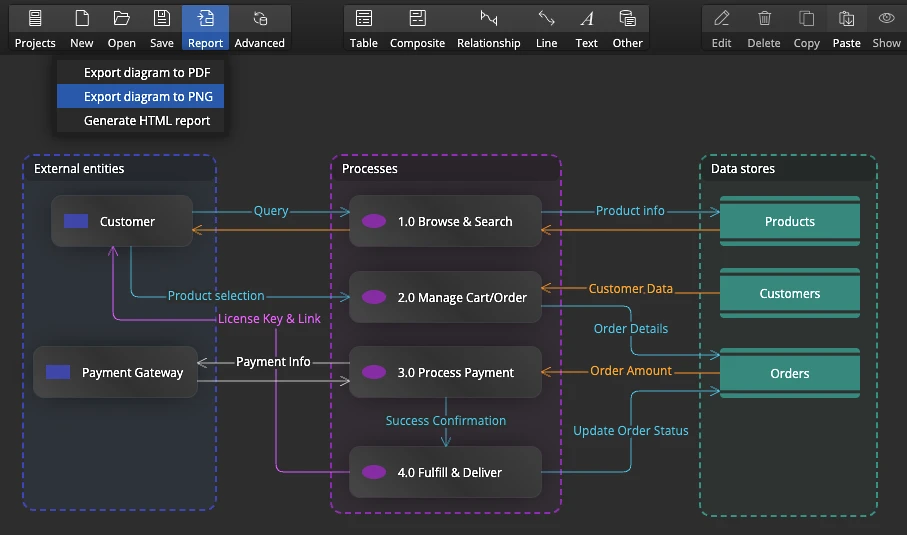
- Flowchart diagram graphics
- Data flows
- Data lineage diagrams
- Data governance visualizations
Inherited an undocumented database? See it clearly in minutes
Easily connect to relational databases like PostgreSQL, Oracle, MySQL, MariaDB, SQLite and SQL Server to generate ER diagrams automatically.
In the Professional version, you can also establish secure SSH/SSL/TLS connections and visualize cloud databases.
See how to visualize existing databases
Learn how to reverse engineer databases

Documentation your team will actually trust
Automatically generate detailed database documentation from ER diagrams. Organize relational structures into sub-diagrams, add HTML annotations, and export reports in interactive HTML, image or PDF formats.
Use the same diagram to keep living database documentation, record data governance notes, and map data lineage in one place.
See how to work with sub-diagramsLearn how to document databases
From diagram to deployable SQL — in your dialect
Easily generate SQL scripts from ER diagrams to define database schemas. Preview and export SQL code for PostgreSQL, Oracle, MySQL, MariaDB, SQLite and SQL Server — perfect for database architects and developers. You can also easily create custom output, SQL scripts, HTML reports, CSV files or even UI includes - it can all be done with custom templates.
See how to use custom properties

Never let schema drift surprise you again
Read more about synchronization
See how to update projects
See how to generate sync SQL scripts

- Free 14 days trial
- No credit card required
Read the press release at apple.com and navigate to the second image in the gallery.
One-Time Purchase
User-Based Perpetual Licenses
- Data modeling, ER diagrams
- Unlimited projects, unlimited tables
- Reverse & forward engineering
- SQL scripts generation
- Custom fields & customization
- Templates for custom output
- Assets & graphics
- All basic edition features
- Advanced reverse engineering
- Secure SSH/TLS connections
- Sub-diagrams
- Interactive reports
- Synchronization features
- Model conversion
- Multiple instances
- All professional edition features
- Navigator for easy schema exploration
- Folder based format for team collaboration
- Command line interface
- CLI configuration wizard
Switching from another tool? See how Luna Modeler compares to erwin, ER/Studio, PowerDesigner, dbdiagram.io, Toad Data Modeler and Vertabelo.
What is a data modeling tool?
A data modeling tool is software that helps database professionals visually design, document, and manage database schemas. It lets you draw data models with entity-relationship diagrams (ERDs), define tables, columns, relationships, and constraints, annotate diagrams, add other graphical elements and then generate SQL scripts or HTML documentation from the visual model.
Which databases does Luna Modeler support as a professional data modeling tool?
Luna Modeler supports PostgreSQL (including PostGIS extensions), Oracle Database, Microsoft SQL Server and Azure SQL, MySQL, MariaDB, and SQLite. It connects to local installations as well as cloud-hosted databases including Supabase, AWS RDS, and Azure SQL Database. The Professional edition adds SSH/SSL/TLS tunnel support for secure remote connections.
Is Luna Modeler a free data modeling tool?
A free 14-day trial, then a one-time $99 USD license — no subscription. The trial needs no credit card and no account, so you just download and start designing. Luna Modeler uses a perpetual licensing model: you pay once and use the software forever. Optional annual update renewals are available for upgrading to the latest versions, but not required to keep using the tool.
What is the difference between a data modeling tool and a database IDE with ER diagrams?
The core difference comes down to designing from scratch versus viewing what already exists.
- Data Modeling Tools (e.g., Luna Modeler): These are architect tools built for blueprints. They let you design complex database schemas visually and completely offline, without needing an actual database up and running. You use them to map out architecture, build new relationships, and generate the code needed to create the database later.
- Database IDEs with ER Diagrams: These are developer tools built for maintenance and interaction. They look at a live, existing database and generate a visual diagram of its current structure. While great for visualizing data and writing queries, they typically aren't designed to architect new relationships or structurally remodel the schema visually.
Does this data modeling tool work offline?
Luna Modeler runs on your computer. No cloud. No subscriptions. You get professional data modeling, SQL generation, comparison, synchronization and documentation. Everything stays local. Used by organizations in 85+ countries who need complete control over their database designs.